
Deploy a Server Load Balancer (SLB) with Ansible
This blog post demonstrates how a Server Load Balancer (SLB) configuration infront of the EmployeeDB Applikation can be automaticly deployed with Ansible. This functionally is typically used by Application and DevOps Teams as part of a Continuous Integration / Continuous Deliver (CI/CD) Pipeline to automatically deploy an Application into Dev, Test or Production stage.

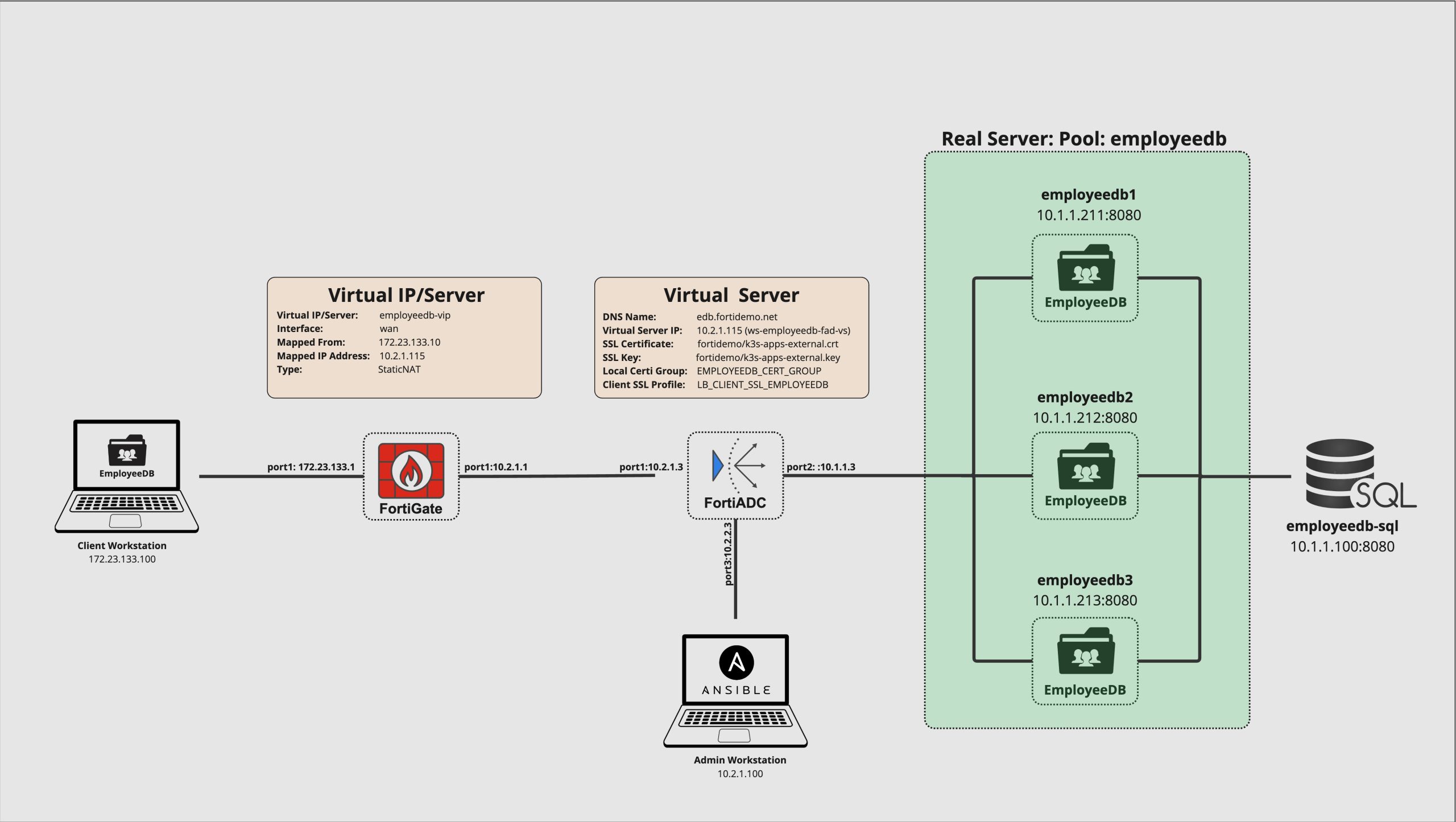
The Picture above shows the demo setup and the involved systems in a overview.
Demo Setup
The Picture below show the demo setup in detail with all involed systems and IP Addresses .
Verify the EmployeeDB Application deployment
The EmpliyeeDB Application bas in preparation for this demo already been deployed on the Backend Servers employeedb1, employeedb2 and employeedb3 along with the PostgreSQL database empliyeedb-sql. Let’s verify that they are up and running.
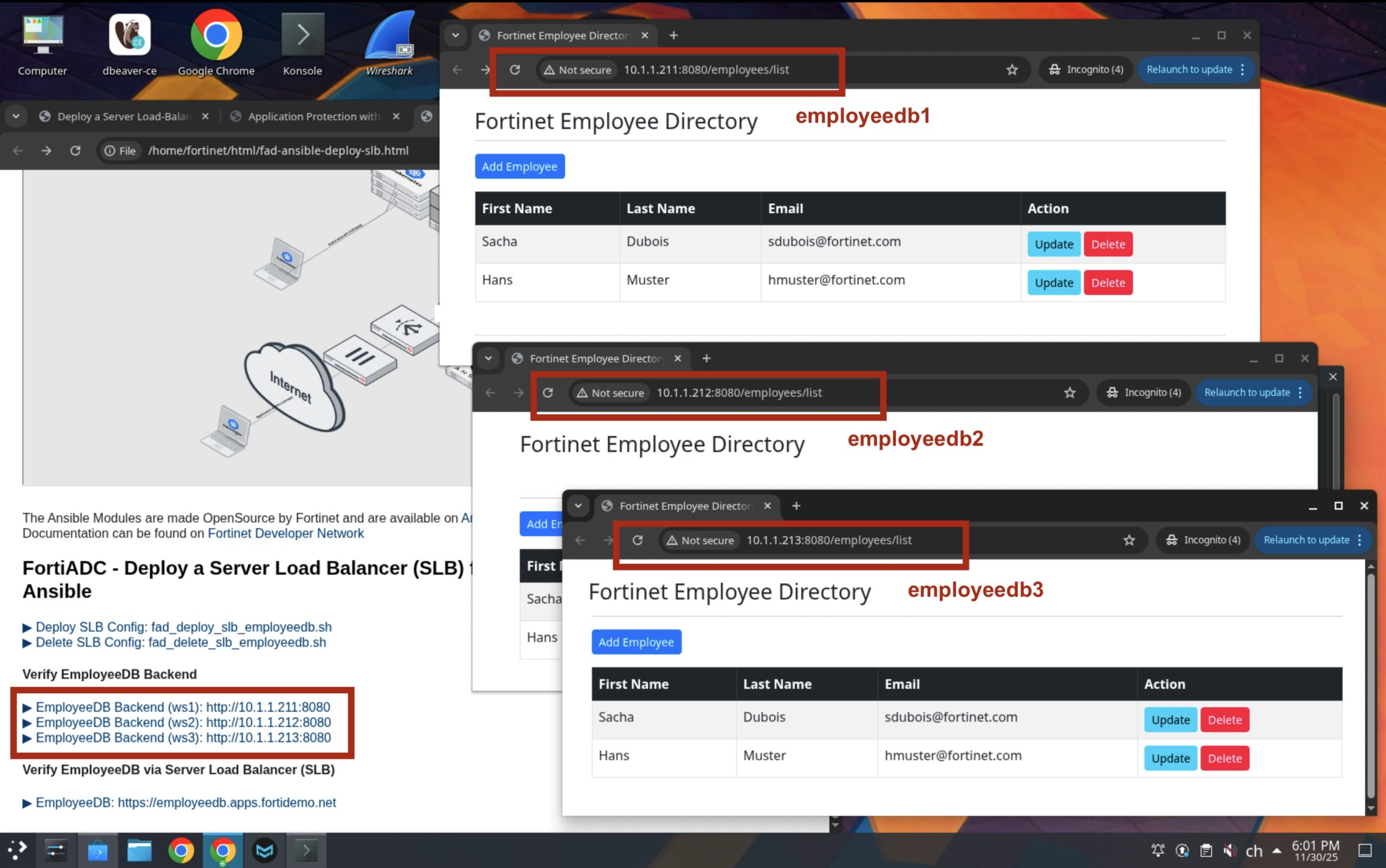
Ay you can see in the picture above, the three deployments can be reached by their IP Adress individually on HTTP port 8080. Be aware that the backend, in this configuration is not TLS/SSL encrypted as we are doing TLS/SSL offloading on the FortiADC to safe resources on the backend server.
Create an Ansible Variable File (fortiadc-lb-vars-employeedb.yaml)
We create first an Ansible values file: fortiadc-lb-vars-employeedb.yaml with all the definitions required for the ansible playbook to execute. With this, we have all the required configuration in one place independant from the playbook. This alowes us to use the same playbook again with the configuration for another application.
# Real Server Pool
pool_name: employeedb

# Virtual Server Configuration
virtual_server_name: ws-employeedb-fad-vs
virtual_server_ip: 10.2.1.115
virtual_server_interface: port1
virtual_server_port: 443
virtual_server_type: http
iptype: ipv4
vdom: root

# Certificate Configuration
ssl_cert: /home/fortinet/cert/fortidemo/k3s-apps-external.crt
ssl_key: /home/fortinet/cert/fortidemo/k3s-apps-external.key
local_cert_group: EMPLOYEEEDB_CERT_GROUP
client_ssl_profile: LB_CLIENT_SSL_EMPLOYEEEDB

# Real Server Pool Members
real_servers:
  - name: rs_employeedb1
    id: 1
    port: 8080
    status: enable
    ip: 10.1.1.211
    weight: 1

  - name: rs_employeedb2
    id: 2
    port: 8080
    status: enable
    ip: 10.1.1.212
    weight: 1

  - name: rs_employeedb3
    id: 3
    port: 8080
    status: enable
    ip: 10.1.1.213
    weight: 1
Protect Secrets with Ansible Vault (ansible-vault)
Its best practices to have all ansible configuration files clean without critical information such as user credentials, certificate and certificate keys as ansible configuration files typically are in stored in a version control system such as GIT where every one is able to see them. Therefor we are using ansible-vault to protect secrets in an encrypted file. Create a protected ansible-vault password in your home directory
=> echo "F0rt!net" > /home/fortinet/.ansible/vault_password
=> chmod 600 /home/fortinet/.ansible/vault_password
=> ls -la $HOME/.ansible/vault_password
   ----------------------------------------------------------------------------------------------------------------------------------------------------------------------------------------------------------------------------------------------
  -rw------- 1 fortinet fortinet 9 Nov 29 20:20 /home/fortinet/.ansible/vault_password
  ----------------------------------------------------------------------------------------------------------------------------------------------------------------------------------------------------------------------------------------------
Create a vault file containing the ‘fortiadc_password’ password in clear text
=> cat /tmp/vault.yaml
   ----------------------------------------------------------------------------------------------------------------------------------------------------------------------------------------------------------------------------------------------
   # vault.yaml
   fortiadc_password: "F0rt!net"
   ----------------------------------------------------------------------------------------------------------------------------------------------------------------------------------------------------------------------------------------------
Encrypt the vault.yaml with ansible-vault
=> ansible-vault encrypt /tmp/vault.yaml --vault-password-file $HOME/.ansible/vault_password
   ----------------------------------------------------------------------------------------------------------------------------------------------------------------------------------------------------------------------------------------------
   Encryption successful
   ----------------------------------------------------------------------------------------------------------------------------------------------------------------------------------------------------------------------------------------------
=> cat /tmp/vault.yaml
   ----------------------------------------------------------------------------------------------------------------------------------------------------------------------------------------------------------------------------------------------
   $ANSIBLE_VAULT;1.1;AES256
   37376462356433376434373039636264636133353863313531626533656266643565633030653032
   3636323732383531323631316338666538633061333361370a393561303662386439353335376532
   34636535356631386634386539623032303431353837396234346438346662353333663537636564
   6631373734643865370a396631376539663965353165333863653735396431623838343061633537
   30383463373436663737343134303464646137313063663039336164396333356664393234363464
   6637313164326339333431303838633566346364343133303931
   ----------------------------------------------------------------------------------------------------------------------------------------------------------------------------------------------------------------------------------------------
Create an Ansible Inventory File
An Ansible inventory file (./inventory) is the file where you define which hosts (devices/servers) Ansible should manage and how to reach them. It’s essentially the target list for the automation.In our case it contains only our FortiADC, but it’s possible to add the FortiGate as well to deploy Firewal Rules releated to the EmployeDB application or to add the PostGRE SQL Server to deploy a database if non is there yet.
=> cat /tmp/inventory
   ----------------------------------------------------------------------------------------------------------------------------------------------------------------------------------------------------------------------------------------------
   [fortiadcs]
   fortiadc ansible_host=10.2.1.3 ansible_user="admin" ansible_password="{{ fortiadc_password }}"

   [fortiadcs:vars]
   ansible_network_os=fortinet.fortiadc.fadcos
   ansible_httpapi_use_ssl=yes
   ansible_httpapi_validate_certs=no
   ansible_httpapi_port=443
   ---------------------------------------------------------------------------------------------------------------------------------------------------------------------------------------------------------------------------------------------
Create and Execute the Ansible Playbook
Let’s create the Ansible Playbook to upload the SSL/TSL Certificate, configure the Real Servers and Real Servers Pool, Health Check, Client SSL Profile and the Virtual Server. The order of these tasks are important, as some are depending on previous executed tasks.
=> cat ./fortiadc-lb-config-ssl.yaml
   ----------------------------------------------------------------------------------------------------------------------------------------------------------------------------------------------------------------------------------------------

     - name: Manage FortiADC real servers
       hosts: fortiadcs
       collections:
         - fortinet.fortiadc
       connection: httpapi
       gather_facts: false
       vars_files:
         - /tmp/vault.yaml  # Load encrypted variables
       tasks:
         - name: Create/Verify real server and change status to 'disable'
           fadcos_real_server:
             action: add
             name: {{ item.name }}
             ip: {{ item.ip }}
             status: disable
             vdom: root
           loop: {{ real_servers }}

         - name: Update IP addresses of real servers
           fadcos_real_server:
             action: edit
             name: {{ item.name }}
             ip: {{ item.ip }}
             status: {{ item.status }}
             vdom: root
           loop: {{ real_servers }}

         - name: Manage Health Checks LBHC_HTTP_200
           fadcos_health_check:
             action: add
             name: LBHC_HTTP_200
             status_code: 200
             send_string: /
             dest_addr_type: ipv4
             hc_type: http
           no_log: true

         - name: Manage Real Server Pool $x{{ pool_name }}
           fadcos_real_server_pool:
             action: add
             name: {{ pool_name }}
             iptype: {{ iptype }}
             vdom: {{ vdom }}
             healthcheck: enable
             health_check_list:
               - LBHC_HTTP_200

         - name: Manage real server pool member
           fadcos_real_server_pool_member:
             action: add
             pool_name: {{ pool_name }}
             status: {{ item.status }}
             member_id: {{ item.id }}
             port: {{ item.port }}
             rs: {{ item.name }}
             weight: {{ item.weight }}
           loop: {{ real_servers }}

         - name: add CertKey
           fadcos_system_certificate_local_upload:
             action: add
             type: CertKey
             name: employeedb-ssl
             certificate_file: {{ ssl_cert }}
             key_file: {{ ssl_key }}

         - name: Manage Local Certificate Group
           fadcos_local_cert_group:
             action: add_group
             name: {{ local_cert_group }}

         - name: Manage Local Certificate Group Members
           fadcos_local_cert_group:
             action: add_member
             local_cert: employeedb-ssl
             name: {{ local_cert_group }}

         - name: Manage Client SSL Profile {{ client_ssl_profile }}
           fadcos_client_ssl_profile:
             action: add
             name: {{ client_ssl_profile }}
             backend_customized_ssl_ciphers_flag: enable
             backend_ssl_OCSP_stapling_support: disable
             backend_ssl_allowed_versions: sslv3 tlsv1.0 tlsv1.1 tlsv1.2
             backend_ssl_sni_forward: disable
             client_certificate_verify_mode: required
             client_sni_required: disable
             customized_ssl_ciphers_flag: disable
             forward_proxy: disable
             forward_proxy_local_signing_ca: SSLPROXY_LOCAL_CA
             http_forward_client_certificate: disable
             http_forward_client_certificate_header: X-Client-Cert
             local_certificate_group: {{ local_cert_group }}
             reject_ocsp_stapling_with_missing_nextupdate: disable
             ssl_allowed_versions: tlsv1.1 tlsv1.2
             ssl_dh_param_size: 1024bit
             ssl_dynamic_record_sizing: disable
             ssl_renegotiate_period: 0
             ssl_renegotiate_size: 0
             ssl_renegotiation: disable
             ssl_renegotiation_interval: -1
             ssl_secure_renegotiation: require
             ssl_session_cache_flag: enable
             use_tls_tickets: enable

         - name: Create basic virtual server {{ virtual_server_name }}
           fadcos_virtual_server:
             name: {{ virtual_server_name }}
             status: enable
             action: add
             iptype: ipv4
             ip: {{ virtual_server_ip }}
             pool: {{ pool_name }}
             port: {{ virtual_server_port }}
             interface: {{ virtual_server_interface }}
             profile: LB_PROF_HTTPS
             vstype: l7-load-balance
             client_ssl_profile: {{ client_ssl_profile }}
     ----------------------------------------------------------------------------------------------------------------------------------------------------------------------------------------------------------------------------------------------
Run the Ansible Playbook (./fortiadc-lb-config-ssl.yaml)
=>   ansible-playbook ./fortiadc-lb-config-ssl.yaml \
          -i ./inventory --extra-vars "@fortiadc-lb-vars-employeedb.yaml" \
          --vault-password-file /home/fortinet/.ansible/vault_password
     ----------------------------------------------------------------------------------------------------------------------------------------------------------------------------------------------------------------------------------------------
     Using /etc/ansible/ansible.cfg as config file

     PLAY [Manage FortiADC real servers] ********************************************

     TASK [Create/Verify real server and change status to 'disable'] ****************
     changed:  => (item={'name': 'rs_employeedb1', 'id': 1, 'port': 8080, 'status': 'enable', 'ip': '10.1.1.211', 'weight': 1}) => {"ansible_loop_var": "item", "changed": true, "item": {"id": 1, "ip": "10.1.1.211", "name": "rs_employeedb1", "port": 8080, "status": "enable", "weight": 1}, "res": {"payload": 0}}
     changed:  => (item={'name': 'rs_employeedb2', 'id': 2, 'port': 8080, 'status': 'enable', 'ip': '10.1.1.212', 'weight': 1}) => {"ansible_loop_var": "item", "changed": true, "item": {"id": 2, "ip": "10.1.1.212", "name": "rs_employeedb2", "port": 8080, "status": "enable", "weight": 1}, "res": {"payload": 0}}
     changed:  => (item={'name': 'rs_employeedb3', 'id': 3, 'port': 8080, 'status': 'enable', 'ip': '10.1.1.213', 'weight': 1}) => {"ansible_loop_var": "item", "changed": true, "item": {"id": 3, "ip": "10.1.1.213", "name": "rs_employeedb3", "port": 8080, "status": "enable", "weight": 1}, "res": {"payload": 0}}

     TASK [Update IP addresses of real servers] *************************************
     changed:  => (item={'name': 'rs_employeedb1', 'id': 1, 'port': 8080, 'status': 'enable', 'ip': '10.1.1.211', 'weight': 1}) => {"ansible_loop_var": "item", "changed": true, "item": {"id": 1, "ip": "10.1.1.211", "name": "rs_employeedb1", "port": 8080, "status": "enable", "weight": 1}, "res": {"payload": 0}}
     changed:  => (item={'name': 'rs_employeedb2', 'id': 2, 'port': 8080, 'status': 'enable', 'ip': '10.1.1.212', 'weight': 1}) => {"ansible_loop_var": "item", "changed": true, "item": {"id": 2, "ip": "10.1.1.212", "name": "rs_employeedb2", "port": 8080, "status": "enable", "weight": 1}, "res": {"payload": 0}}
     changed:  => (item={'name': 'rs_employeedb3', 'id': 3, 'port': 8080, 'status': 'enable', 'ip': '10.1.1.213', 'weight': 1}) => {"ansible_loop_var": "item", "changed": true, "item": {"id": 3, "ip": "10.1.1.213", "name": "rs_employeedb3", "port": 8080, "status": "enable", "weight": 1}, "res": {"payload": 0}}

     TASK [Manage Health Checks LBHC_HTTP_200] **************************************
     changed:  => {"censored": "the output has been hidden due to the fact that 'no_log: true' was specified for this result", "changed": true}

     TASK [Manage Real Server Pool $xemployeedb] ************************************
     changed:  => {"changed": true, "res": {"payload": 0}}

     TASK [Manage real server pool member] ******************************************
     changed:  => (item={'name': 'rs_employeedb1', 'id': 1, 'port': 8080, 'status': 'enable', 'ip': '10.1.1.211', 'weight': 1}) => {"ansible_loop_var": "item", "changed": true, "item": {"id": 1, "ip": "10.1.1.211", "name": "rs_employeedb1", "port": 8080, "status": "enable", "weight": 1}, "res": {"payload": 0}}
     changed:  => (item={'name': 'rs_employeedb2', 'id': 2, 'port': 8080, 'status': 'enable', 'ip': '10.1.1.212', 'weight': 1}) => {"ansible_loop_var": "item", "changed": true, "item": {"id": 2, "ip": "10.1.1.212", "name": "rs_employeedb2", "port": 8080, "status": "enable", "weight": 1}, "res": {"payload": 0}}
     changed:  => (item={'name': 'rs_employeedb3', 'id': 3, 'port': 8080, 'status': 'enable', 'ip': '10.1.1.213', 'weight': 1}) => {"ansible_loop_var": "item", "changed": true, "item": {"id": 3, "ip": "10.1.1.213", "name": "rs_employeedb3", "port": 8080, "status": "enable", "weight": 1}, "res": {"payload": 0}}

     TASK  *************************************************************
     changed:  => {"changed": true, "res": {"payload": 0}}

     TASK [Manage Local Certificate Group] ******************************************
     changed:  => {"changed": true, "res": {"payload": 0}}

     TASK [Manage Local Certificate Group Members] **********************************
     changed:  => {"changed": true, "res": {"payload": 0}}

     TASK [Manage Client SSL Profile LB_CLIENT_SSL_EMPLOYEEDB] **********************
     changed:  => {"changed": true, "res": {"payload": 0}}

     TASK [Create basic virtual server ws-employeedb-fad-vs] ************************
     changed:  => {"changed": true, "res": {"payload": 0}}

     PLAY RECAP *********************************************************************
     fortiadc                   : ok=10   changed=10   unreachable=0    failed=0    skipped=0    rescued=0    ignored=0
Verify the EmployeeDB application deployment
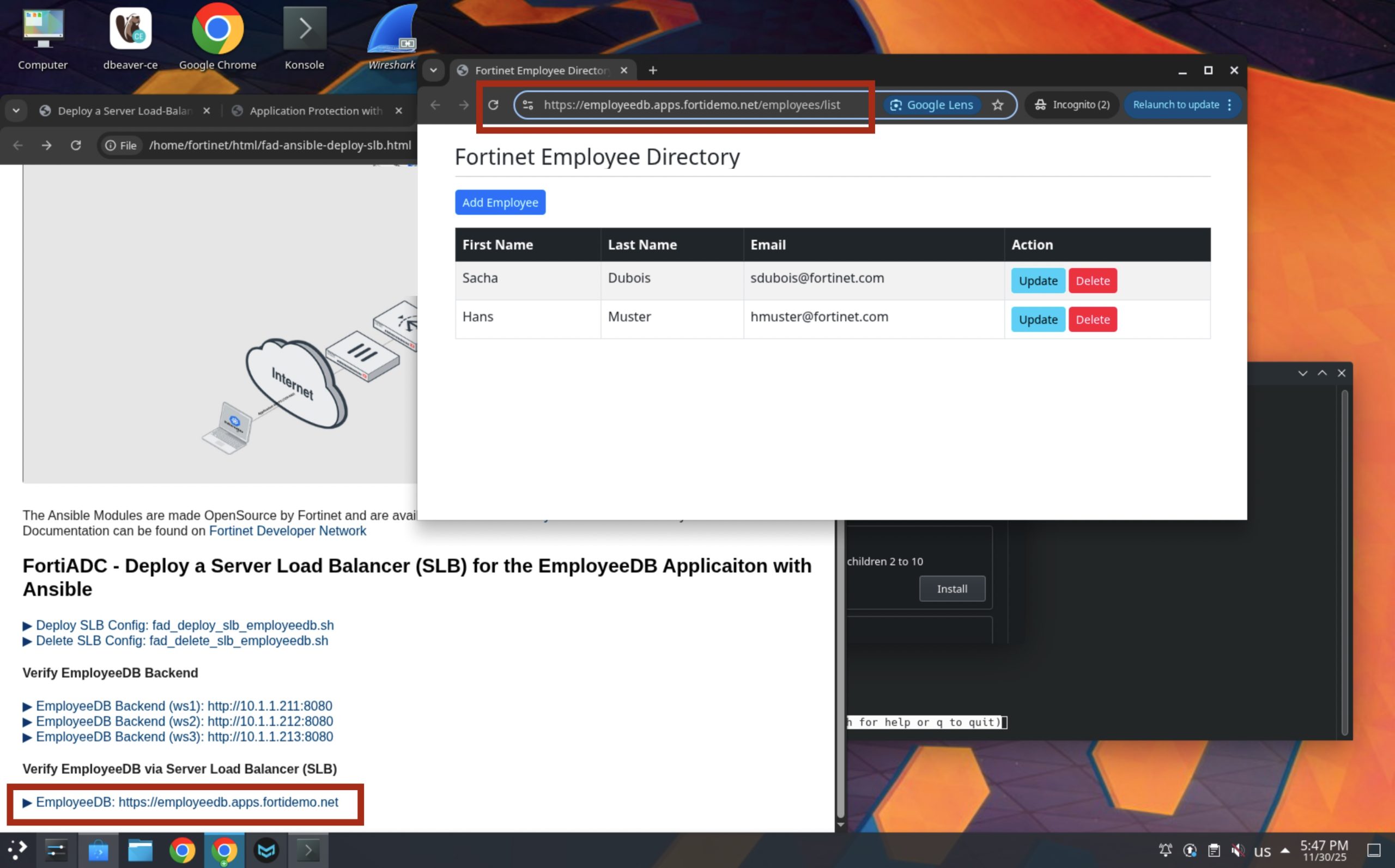
After the Ansible Playbook has been successfully completed, we can now verify that the application EmployeeDB is working correctly. The following command connection to the Java Spring Boot Actuator interface to verify the application’s health.
=> curl https://employeedb.apps.fortidemo.net/actuator/health 2>/dev/null | jq -r
   ----------------------------------------------------------------------------------------------------------------------------------------------------------------------------------------------------------------------------------------------
   {
   . "status": "UP"=fortinet.fortiadc.fadcos
   }
   ---------------------------------------------------------------------------------------------------------------------------------------------------------------------------------------------------------------------------------------------
Now let’s see the EmployeeDB Application shown from the Web Browser.
Verify FortiADC Configuration
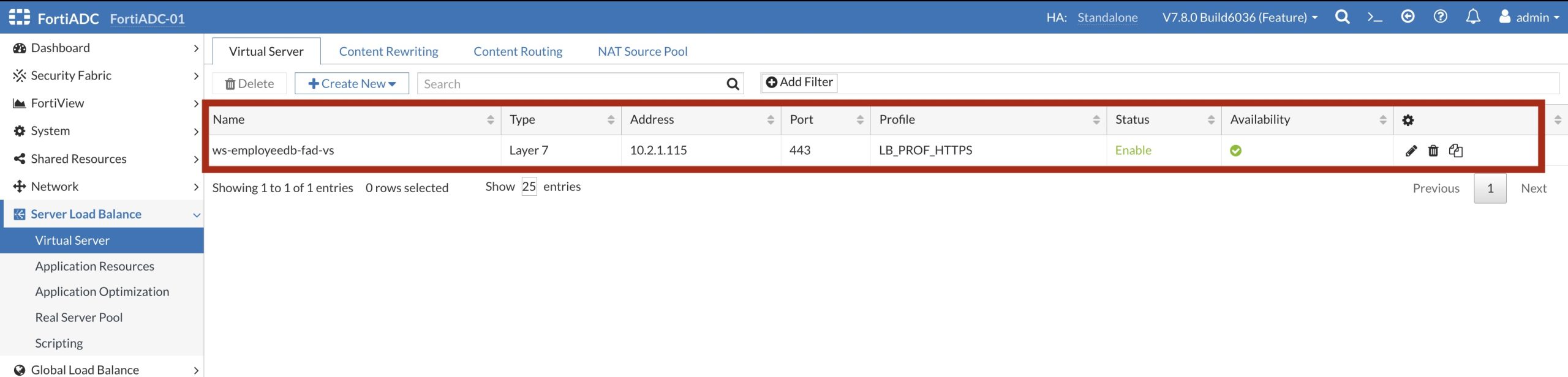
In the FortiADC UI we can clearly see that the Cirtual Server ws-empliyeedb-fad-vs has been created with the IP Address: 10.2.1.115
The detail configuration shows that the Ansible Playbook created a Layer-7 Load Balancer.
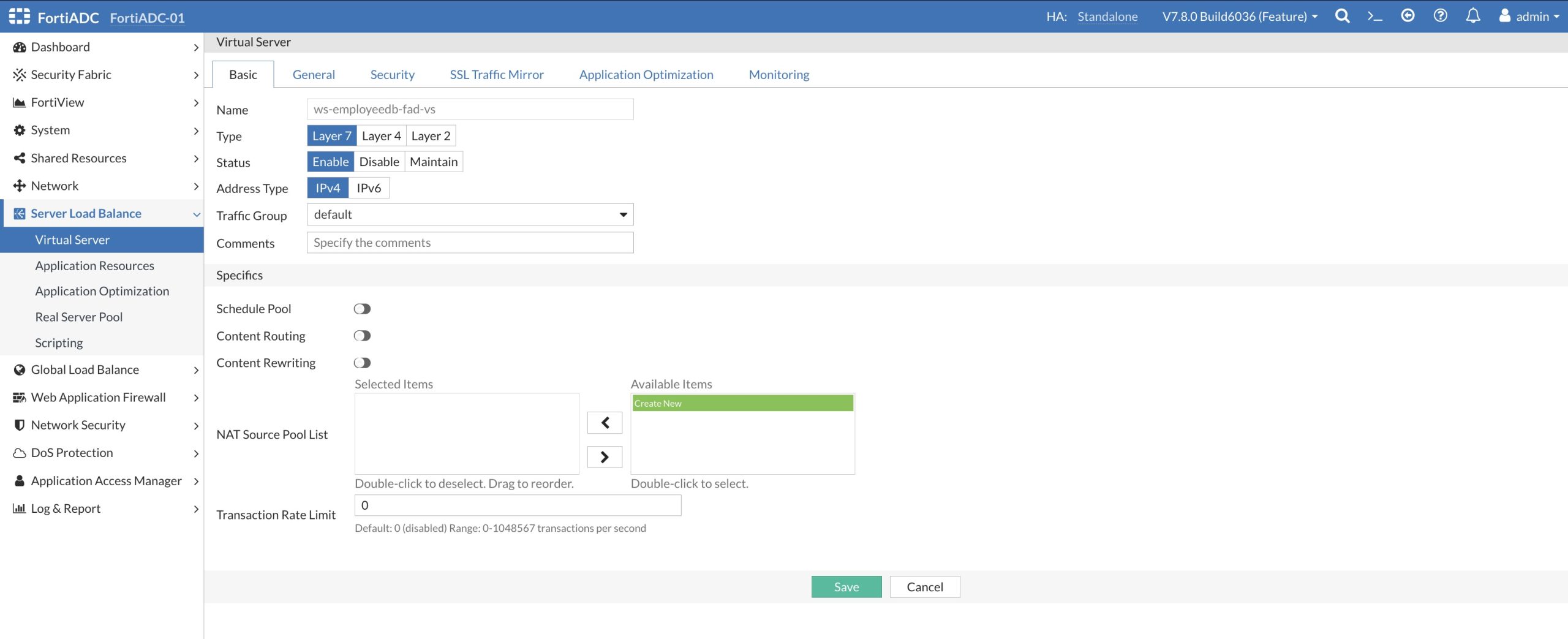
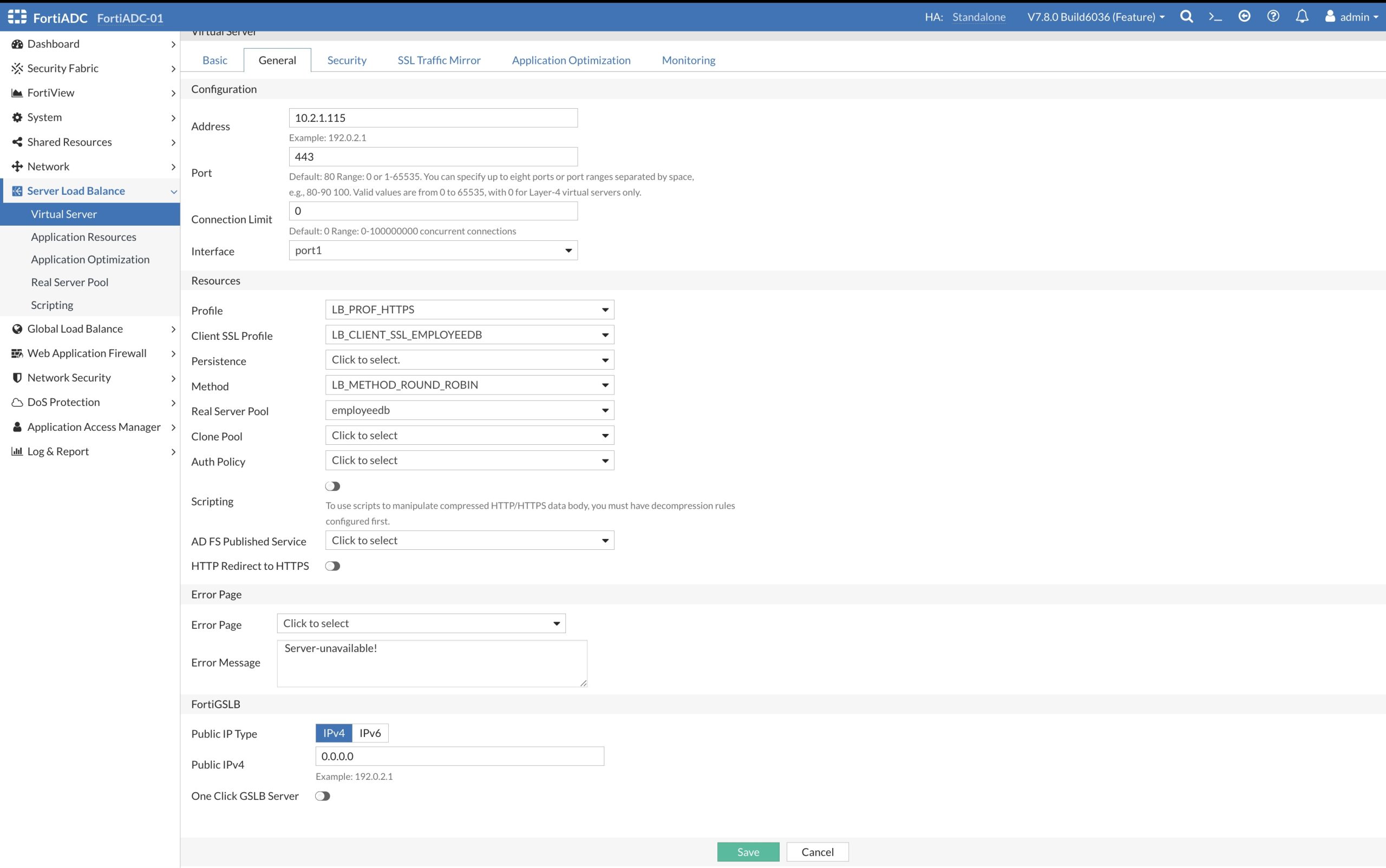
The information in the ‘General’ tab shows the Load Balancer Profile: HB_PROF_HTTPS containing our Health Check configuration, the Client SSL Profile containing the SSL/TLS Certificate Group with the Certificate and it shows the new created Real Server Pool: employeedb.
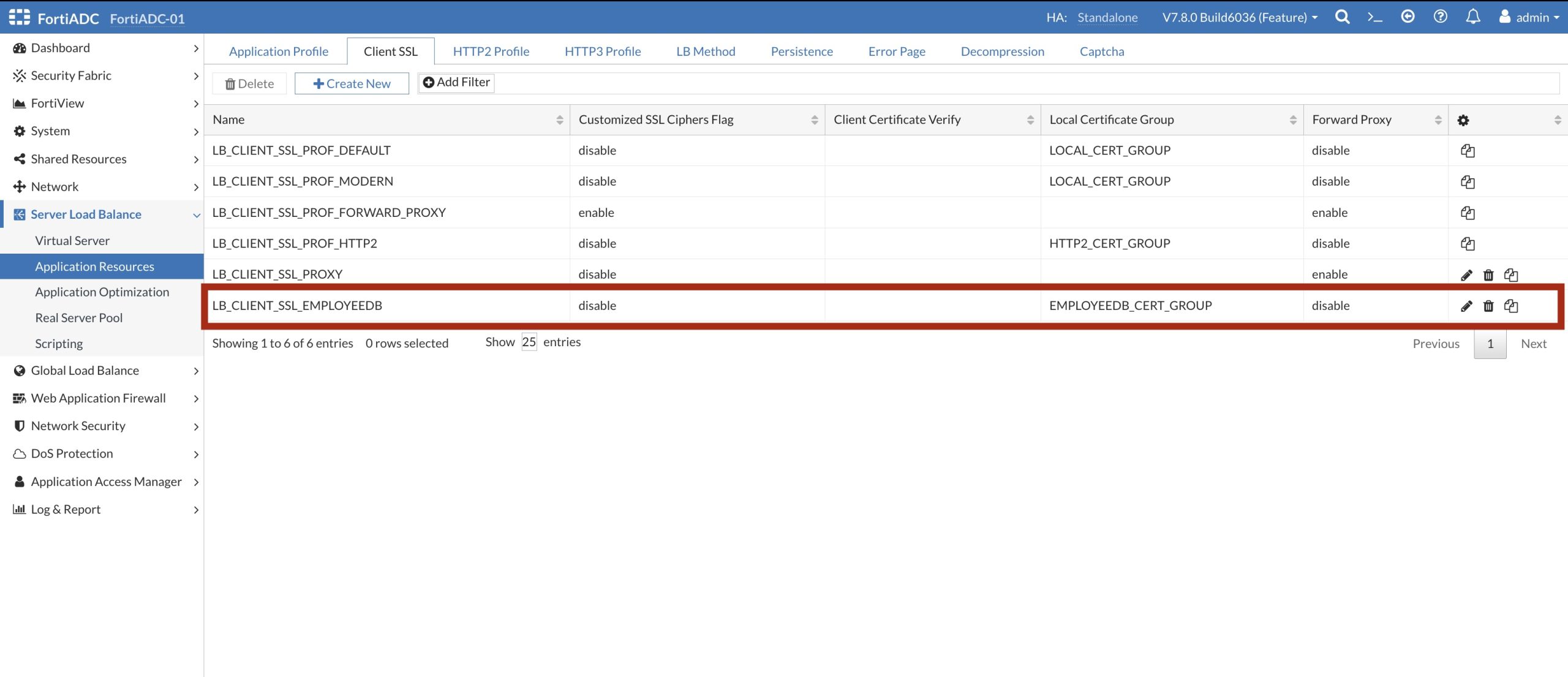
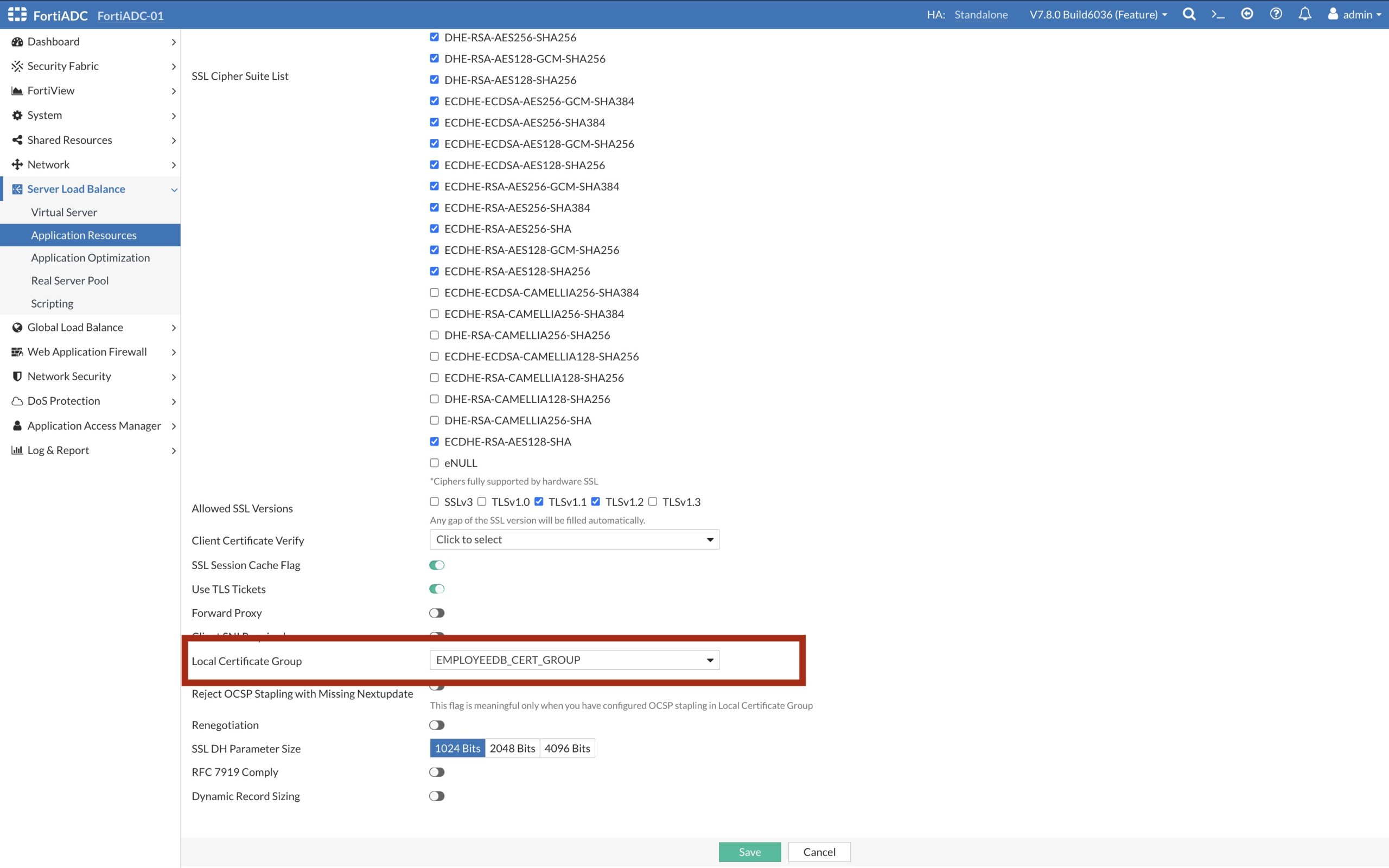
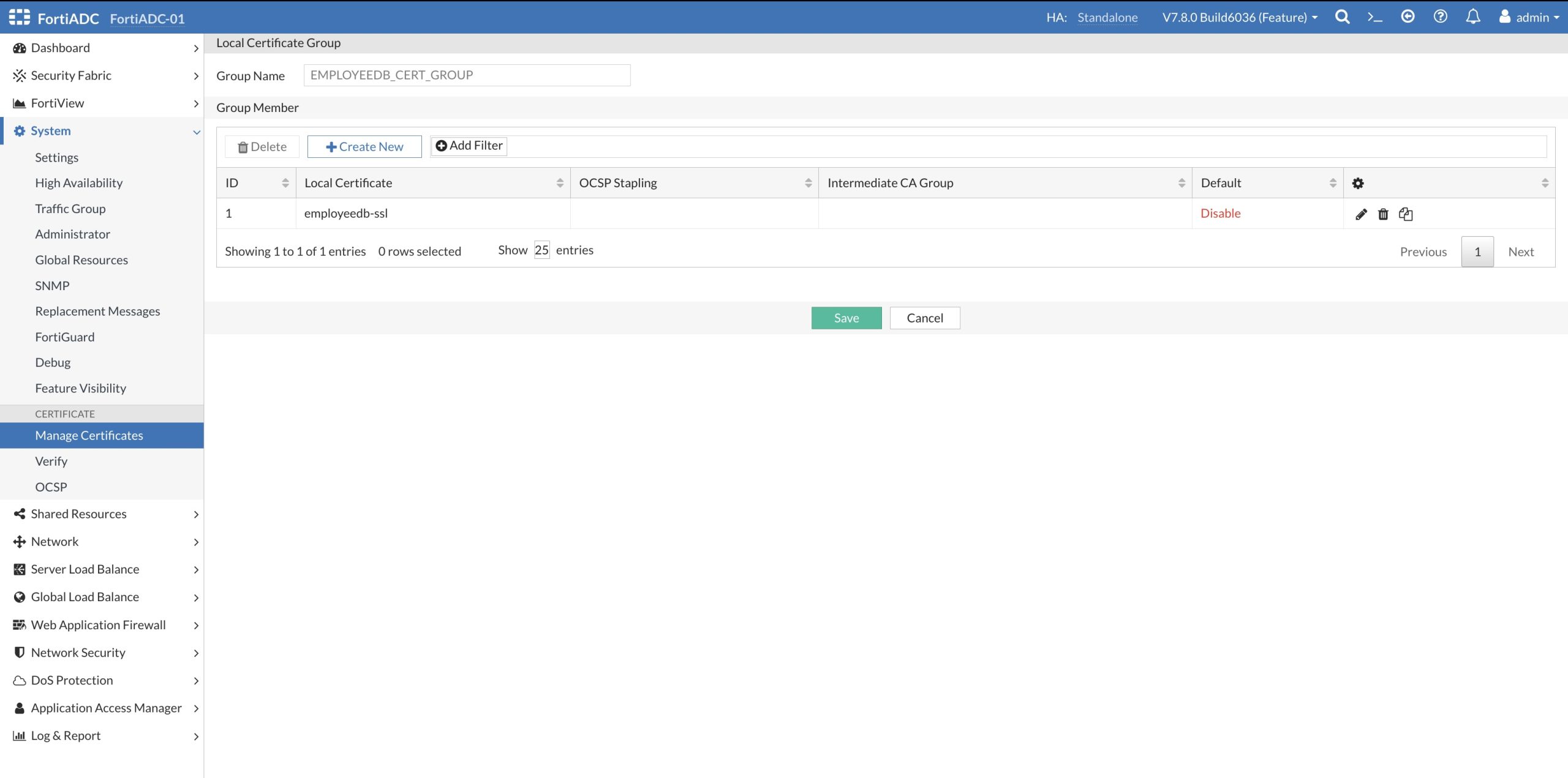
The Client SSL Profile: LB_CLIENT_SSL_EMPLOYEEDB defines supported SSL Cipher and supported SSL Versions, as well as the Certificate Group: EMPLOYEEDB_CERT_GROUP containing the SSL/TLS certificate shown below.
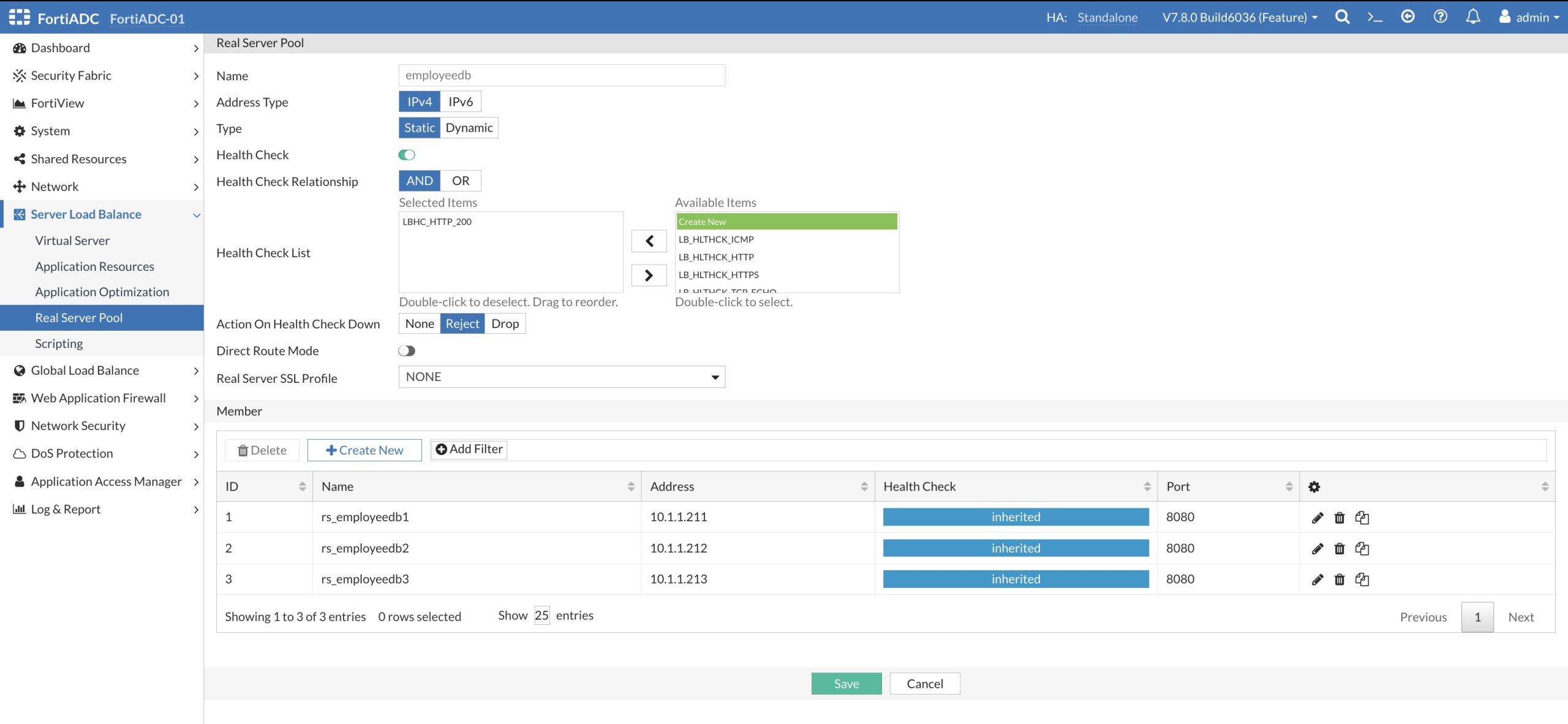
TIn the picture below, you can see the definition of the Real Server Pool: employeedb just created with the three Real Servers employeedb1, employeedb2 and employeedb3 that act as the EmployeeDB Application backend servers.
Test Load Balancing behavior
In the following secrion we would like to test the Load Balancing behavior. Currently we have selected Round Robin as the Load Balancing method. Let’s generate again some traffic and watch the balancing across the Real Servers. To create the load, we use the following script.
#!/bin/bash
# ============================================================================================
# File: ........: genTrafficDocker.sh
# Demo Package .: fortiadc-slb-employdb-ansible
# Language .....: bash
# Author .......: Sacha Dubois/span>
# --------------------------------------------------------------------------------------------
# Category .....: Ansible
# Description ..: Generates load on the actuator/health endpoint and count entries in the logs
# ============================================================================================

st1=$(ssh -o StrictHostKeyChecking=no -o UserKnownHostsFile=/dev/null fortinet@10.1.1.211 -n "docker logs edb" 2>/dev/null | grep -c "GET \"/actuator")
st2=$(ssh -o StrictHostKeyChecking=no -o UserKnownHostsFile=/dev/null fortinet@10.1.1.212 -n "docker logs edb" 2>/dev/null | grep -c "GET \"/actuator")
st3=$(ssh -o StrictHostKeyChecking=no -o UserKnownHostsFile=/dev/null fortinet@10.1.1.213 -n "docker logs edb" 2>/dev/null | grep -c "GET \"/actuator")

ls1=0; ls2=0; ls3=0; cnt=1
while [ $cnt -le 10 ]; do
  curl https://${APPNAME}.${DOMAIN}/actuator/health > /dev/null 2>&1

  cn1=$(ssh fortinet@10.1.1.211 -n "docker logs edb" 2>/dev/null | grep -c "GET \"/actuator")
  cn2=$(ssh fortinet@10.1.1.212 -n "docker logs edb" 2>/dev/null | grep -c "GET \"/actuator")
  cn3=$(ssh fortinet@10.1.1.213 -n "docker logs edb" 2>/dev/null | grep -c "GET \"/actuator")

  let tt1=cn1-st1
  let tt2=cn2-st2
  let tt3=cn3-st3

  tx1=$(printf "%02d\n" $tt1)
  tx2=$(printf "%02d\n" $tt2)
  tx3=$(printf "%02d\n" $tt3)
  hdr=$(printf "%03d\n" $cnt)

  echo -e "     [${hdr}] https://${APPNAME}.${DOMAIN}/actuator/health                       $tx1   $tx2   $tx3"

  ls1=$tt1; ls2=$tt2; ls3=$tt3
  let cnt=cnt+1
  sleep 2
done
=>  ./genTrafficDocker.sh
    -----------------------------------------------------------------------------------------------------------------
    [001] https://employeedb.apps.fortidemo.net/actuator/health   10.1.1.211 [01]   10.1.1.212 [00]   10.1.1.213 [00]
    [002] https://employeedb.apps.fortidemo.net/actuator/health   10.1.1.211 [01]   10.1.1.212 [01]   10.1.1.213 [00]
    [003] https://employeedb.apps.fortidemo.net/actuator/health   10.1.1.211 [01]   10.1.1.212 [01]   10.1.1.213 [01]
    [004] https://employeedb.apps.fortidemo.net/actuator/health   10.1.1.211 [02]   10.1.1.212 [01]   10.1.1.213 [01]
    [005] https://employeedb.apps.fortidemo.net/actuator/health   10.1.1.211 [02]   10.1.1.212 [02]   10.1.1.213 [01]
    [006] https://employeedb.apps.fortidemo.net/actuator/health   10.1.1.211 [02]   10.1.1.212 [02]   10.1.1.213 [02]
    [007] https://employeedb.apps.fortidemo.net/actuator/health   10.1.1.211 [03]   10.1.1.212 [02]   10.1.1.213 [02]
    [008] https://employeedb.apps.fortidemo.net/actuator/health   10.1.1.211 [03]   10.1.1.212 [03]   10.1.1.213 [02]
    [009] https://employeedb.apps.fortidemo.net/actuator/health   10.1.1.211 [03]   10.1.1.212 [03]   10.1.1.213 [03]
    [010] https://employeedb.apps.fortidemo.net/actuator/health   10.1.1.211 [04]   10.1.1.212 [03]   10.1.1.213 [03]
    -----------------------------------------------------------------------------------------------------------------
The test shows that the packages are evenly distributed over the three Real Servers. Now we are going to modify the configuration that each Member gets the following traffic weighing (Member-1: 1, Member-2, 3 and Member-3: 5).
=> cat ./fortiadc-lb-vars-employeedb.yaml
   ----------------------------------------------------------------------------------------------------------------------------------------------------------------------------------------------------------------------------------------------
  # Real Server Pool
  pool_name: employeedb

  # Virtual Server Configuration
  virtual_server_name: employeedb
  virtual_server_ip: 10.2.2.50
  virtual_server_interface: port3
  virtual_server_port: 80
  virtual_server_type: http
  iptype: ipv4
  vdom: root

  # Real Server Pool Members
  real_servers:
    - name: rs_employeedb1
      id: 1
      port: 8080
      status: enable
      ip: 10.1.1.211
      weight: 1

    - name: rs_employeedb2
      id: 2
      port: 8080
      status: enable
      ip: 10.1.1.212
      weight: 3

    - name: rs_employeedb3
      id: 3
      port: 8080
      status: enable
      ip: 10.1.1.213
      weight: 5
   ---------------------------------------------------------------------------------------------------------------------------------------------------------------------------------------------------------------------------------------------
To only update the Real Server Pool Members, we create an Real Server Pool Member Ansible Playbook
=> cat ./fortiadc-lb-vars-employeedb.yaml
   ----------------------------------------------------------------------------------------------------------------------------------------------------------------------------------------------------------------------------------------------
   - name: Manage FortiADC real servers
  hosts: fortiadcs
  collections:
    - fortinet.fortiadc
  connection: httpapi
  gather_facts: false
  vars_files:
    - /tmp/vault.yaml  # Load encrypted variables

  tasks:
    - name: Manage real server pool member
      fadcos_real_server_pool_member:
        action: edit
        pool_name: "{{ pool_name }}"
        status: "{{ item.status }}"
        member_id: "{{ item.id }}"
        port: "{{ item.port }}"
        rs: "{{ item.name }}"
        weight: "{{ item.weight }}"
      loop: "{{ real_servers }}"
   ---------------------------------------------------------------------------------------------------------------------------------------------------------------------------------------------------------------------------------------------
Configure the Server Load Balancer with the Ansible Playbook
=> ansible-playbook ./fortiadc-lb-member-update.yaml \
          -i /tmp/inventory --extra-vars "@./fortiadc-lb-vars-employeedb.yaml" \
          --vault-password-file /home/fortinet/.ansible/vault_password
    ----------------------------------------------------------------------------------------------------------------------------------------------------------------------------------------------------------------------------------------------
    PLAY [Manage FortiADC real servers] ********************************************

    TASK [Manage real server pool member] ******************************************
    changed:  => (item={'name': 'rs_employeedb1', 'id': 1, 'port': 8080, 'status': 'enable', 'ip': '10.1.1.211', 'weight': 1})
    changed:  => (item={'name': 'rs_employeedb2', 'id': 2, 'port': 8080, 'status': 'enable', 'ip': '10.1.1.212', 'weight': 3})
    changed:  => (item={'name': 'rs_employeedb3', 'id': 3, 'port': 8080, 'status': 'enable', 'ip': '10.1.1.213', 'weight': 5})

    PLAY RECAP *********************************************************************
    fortiadc                   : ok=1    changed=1    unreachable=0    failed=0     skipped=0    rescued=0    ignored=0
    ----------------------------------------------------------------------------------------------------------------------------------------------------------------------------------------------------------------------------------------------
Let’s generate again some traffic and watch the balancing across the Real Servers with the modified weighing. As we can see in the output below, Member-1 is getting only one request where Member-3 is having the most of the traffic.
=>  ./genTrafficDocker.sh
    -----------------------------------------------------------------------------------------------------------------
    [001] https://employeedb.apps.fortidemo.net/actuator/health   10.1.1.211 [00]   10.1.1.212 [00]   10.1.1.213 [01]
    [002] https://employeedb.apps.fortidemo.net/actuator/health   10.1.1.211 [00]   10.1.1.212 [01]   10.1.1.213 [01]
    [003] https://employeedb.apps.fortidemo.net/actuator/health   10.1.1.211 [00]   10.1.1.212 [01]   10.1.1.213 [02]
    [004] https://employeedb.apps.fortidemo.net/actuator/health   10.1.1.211 [00]   10.1.1.212 [02]   10.1.1.213 [02]
    [005] https://employeedb.apps.fortidemo.net/actuator/health   10.1.1.211 [00]   10.1.1.212 [02]   10.1.1.213 [03]
    [006] https://employeedb.apps.fortidemo.net/actuator/health   10.1.1.211 [00]   10.1.1.212 [03]   10.1.1.213 [03]
    [007] https://employeedb.apps.fortidemo.net/actuator/health   10.1.1.211 [00]   10.1.1.212 [03]   10.1.1.213 [04]
    [008] https://employeedb.apps.fortidemo.net/actuator/health   10.1.1.211 [00]   10.1.1.212 [03]   10.1.1.213 [05]
    [009] https://employeedb.apps.fortidemo.net/actuator/health   10.1.1.211 [01]   10.1.1.212 [03]   10.1.1.213 [05]
    [010] https://employeedb.apps.fortidemo.net/actuator/health   10.1.1.211 [01]   10.1.1.212 [03]   10.1.1.213 [06]
    -----------------------------------------------------------------------------------------------------------------
We are going to modify the configuration that Member-2 gets disabled. This is useful in case that a Real Server needs to be taken down for maintenance and the packages should be distributed to the other Servers instead.
=> cat /tmp/fortiadc-lb-vars-employeedb.yaml
   ----------------------------------------------------------------------------------------------------------------------------------------------------------------------------------------------------------------------------------------------
   # Real Server Pool
    pool_name: employeedb

   # Virtual Server Configuration
   virtual_server_name: employeedb
   virtual_server_ip: 10.2.2.50
   virtual_server_interface: port3
   virtual_server_port: 80
   virtual_server_type: http
   iptype: ipv4
   vdom: root

   # Real Server Pool Members
   real_servers:
     - name: rs_employeedb1
       id: 1
       port: 8080
       status: enable
       ip: 10.1.1.211
       weight: 1

     - name: rs_employeedb2
       id: 2
       port: 8080
       status: disable
       ip: 10.1.1.212
       weight: 1

     - name: rs_employeedb3
       id: 3
       port: 8080
       status: enable
       ip: 10.1.1.213
       weight: 1
   ----------------------------------------------------------------------------------------------------------------------------------------------------------------------------------------------------------------------------------------------
To only update the Real Server Pool Members, we create an Real Server Pool Member Ansible Playbook
=> cat ./fortiadc-lb-member-update.yaml
   ----------------------------------------------------------------------------------------------------------------------------------------------------------------------------------------------------------------------------------------------
   - name: Manage FortiADC real servers
     hosts: fortiadcs
     collections:
       - fortinet.fortiadc
     connection: httpapi
     gather_facts: false
     vars_files:
       - /tmp/vault.yaml  # Load encrypted variables

     tasks:
       - name: Manage real server pool member
         fadcos_real_server_pool_member:
           action: edit
           pool_name: "{{ pool_name }}"
           status: "{{ item.status }}"
           member_id: "{{ item.id }}"
           port: "{{ item.port }}"
           rs: "{{ item.name }}"
           weight: "{{ item.weight }}"
         loop: "{{ real_servers }}"
   ----------------------------------------------------------------------------------------------------------------------------------------------------------------------------------------------------------------------------------------------
Configure the Server Load Balancer with the Ansible Playbook
=> ansible-playbook ./fortiadc-lb-member-update.yaml \
          -i /tmp/inventory --extra-vars "@./fortiadc-lb-vars-employeedb.yaml" \
          --vault-password-file /home/fortinet/.ansible/vault_password
    ----------------------------------------------------------------------------------------------------------------------------------------------------------------------------------------------------------------------------------------------
    PLAY [Manage FortiADC real servers] ********************************************

    TASK [Manage real server pool member] ******************************************
    changed:  => (item={'name': 'rs_employeedb1', 'id': 1, 'port': 8080, 'status': 'enable', 'ip': '10.1.1.211', 'weight': 1})
    changed:  => (item={'name': 'rs_employeedb2', 'id': 2, 'port': 8080, 'status': 'disable', 'ip': '10.1.1.212', 'weight': 1})
    changed:  => (item={'name': 'rs_employeedb3', 'id': 3, 'port': 8080, 'status': 'enable', 'ip': '10.1.1.213', 'weight': 1})

    PLAY RECAP *********************************************************************
    fortiadc                   : ok=1    changed=1    unreachable=0    failed=0     skipped=0    rescued=0    ignored=0
    ----------------------------------------------------------------------------------------------------------------------------------------------------------------------------------------------------------------------------------------------
Let’s generate again some traffic and watch the balancing.
=>  ./genTrafficDocker.sh
    -----------------------------------------------------------------------------------------------------------------
    [001] https://employeedb.apps.fortidemo.net/actuator/health   10.1.1.211 [01]   10.1.1.212 [00]   10.1.1.213 [00]
    [002] https://employeedb.apps.fortidemo.net/actuator/health   10.1.1.211 [01]   10.1.1.212 [00]   10.1.1.213 [01]
    [003] https://employeedb.apps.fortidemo.net/actuator/health   10.1.1.211 [02]   10.1.1.212 [00]   10.1.1.213 [01]
    [004] https://employeedb.apps.fortidemo.net/actuator/health   10.1.1.211 [02]   10.1.1.212 [00]   10.1.1.213 [02]
    [005] https://employeedb.apps.fortidemo.net/actuator/health   10.1.1.211 [03]   10.1.1.212 [00]   10.1.1.213 [02]
    [006] https://employeedb.apps.fortidemo.net/actuator/health   10.1.1.211 [03]   10.1.1.212 [00]   10.1.1.213 [03]
    [007] https://employeedb.apps.fortidemo.net/actuator/health   10.1.1.211 [04]   10.1.1.212 [00]   10.1.1.213 [03]
    [008] https://employeedb.apps.fortidemo.net/actuator/health   10.1.1.211 [04]   10.1.1.212 [00]   10.1.1.213 [04]
    [009] https://employeedb.apps.fortidemo.net/actuator/health   10.1.1.211 [05]   10.1.1.212 [00]   10.1.1.213 [04]
    [010] https://employeedb.apps.fortidemo.net/actuator/health   10.1.1.211 [05]   10.1.1.212 [00]   10.1.1.213 [05]
    -----------------------------------------------------------------------------------------------------------------
Cleaning Up
Let’s review the ansible variable file: fortiadc-lb-vars-employeedb.yaml and the ./inventory created while deploying the EmpliyeeDB Application.
# Real Server Pool
pool_name: employeedb

# Virtual Server Configuration
virtual_server_name: ws-employeedb-fad-vs
virtual_server_ip: 10.2.1.115
virtual_server_interface: port1
virtual_server_port: 443
virtual_server_type: http
iptype: ipv4
vdom: root

# Certificate Configuration
ssl_cert: /home/fortinet/cert/fortidemo/k3s-apps-external.crt
ssl_key: /home/fortinet/cert/fortidemo/k3s-apps-external.key
local_cert_group: EMPLOYEEEDB_CERT_GROUP
client_ssl_profile: LB_CLIENT_SSL_EMPLOYEEEDB

# Real Server Pool Members
real_servers:
  - name: rs_employeedb1
    id: 1
    port: 8080
    status: enable
    ip: 10.1.1.211
    weight: 1

  - name: rs_employeedb2
    id: 2
    port: 8080
    status: enable
    ip: 10.1.1.212
    weight: 1

  - name: rs_employeedb3
    id: 3
    port: 8080
    status: enable
    ip: 10.1.1.213
    weight: 1
=> cat /tmp/inventory
   ----------------------------------------------------------------------------------------------------------------------------------------------------------------------------------------------------------------------------------------------
   [fortiadcs]
   fortiadc ansible_host=10.2.1.3 ansible_user="admin" ansible_password="{{ fortiadc_password }}"

   [fortiadcs:vars]
   ansible_network_os=fortinet.fortiadc.fadcos
   ansible_httpapi_use_ssl=yes
   ansible_httpapi_validate_certs=no
   ansible_httpapi_port=443
   ---------------------------------------------------------------------------------------------------------------------------------------------------------------------------------------------------------------------------------------------
To delete the configuaration we need to create a removal Playbook to cleanup the configuration
=>  cat /tmp/fortiadc-lb-delete-ssl.yaml
    ----------------------------------------------------------------------------------------------------------------------------------------------------------------------------------------------------------------------------------------------
- name: Manage FortiADC real servers
  hosts: fortiadcs
  collections:
    - fortinet.fortiadc
  connection: httpapi
  gather_facts: false
  vars_files:
    - /tmp/vault.yaml  # Load encrypted variables
  tasks:
    - name: Delete virtual server {{ virtual_server_name }}
      fadcos_virtual_server:
        name: "{{ virtual_server_name }}"
        action: delete
        ip: "{{ virtual_server_ip }}"
        pool: "{{ pool_name }}"
        port: "{{ virtual_server_port }}"
        interface: "{{ virtual_server_interface }}"
        profile: LB_PROF_HTTPS
        vstype: l7-load-balance
        client_ssl_profile: "{{ client_ssl_profile }}"

    - name: Delete virtual server
      fadcos_virtual_server:
        action: delete
        name: "{{ virtual_server_name }}"

    - name: Delete real server pool member
      fadcos_real_server_pool_member:
        action: delete
        pool_name: "{{ pool_name }}"
        member_id: "{{ item.id }}"
        rs: "{{ item.name }}"
      loop: "{{ real_servers }}"

    - name: Delete the Real Server Pool
      fadcos_real_server_pool:
        action: delete
        name: "{{ pool_name }}"

    - name: Delete the real server
      fadcos_real_server:
        action: delete
        name: "{{ item.name }}"
      loop: "{{ real_servers }}"

    - name: Delete Health Checks
      fadcos_health_check:
        action: delete
        name: LBHC_HTTP_200
      no_log: true

    - name: Manage Client SSL Profile {{ client_ssl_profile }}
      fadcos_client_ssl_profile:
        action: delete
        name: "{{ client_ssl_profile }}"

    - name: Manage Local Certificate Group Members
      fadcos_local_cert_group:
        action: delete_member
        member_id: 1
        local_cert: employeedb-ssl
        name: "{{ local_cert_group }}"

    - name: Manage Local Certificate Group
      fadcos_local_cert_group:
        action: delete_group
        name: "{{ local_cert_group }}"

    - name: Delete Local Certificate
      fadcos_system_certificate_local:
        action: remove
        name: employeedb-ssl
    ----------------------------------------------------------------------------------------------------------------------------------------------------------------------------------------------------------------------------------------------
Delete the Server Load Balancer with the Ansible Playbook
 => ansible-playbook /tmp/fortiadc-lb-delete-ssl.yaml \
          -i /tmp/inventory --extra-vars "@/tmp/fortiadc-lb-vars-employeedb.yaml" \
          --vault-password-file /home/fortinet/.ansible/vault_password
    ----------------------------------------------------------------------------------------------------------------------------------------------------------------------------------------------------------------------------------------------
    PLAY [Manage FortiADC real servers] ********************************************

    TASK [Create basic virtual server ws-employeedb-fad-vs] ************************
    changed:

    TASK [Delete virtual server] ***************************************************
    ok:

    TASK [Delete real server pool member] ******************************************
    changed:  => (item={'name': 'rs_employeedb1', 'id': 1, 'port':     8080, 'status': 'enable', 'ip': None, 'weight': 1})
    changed:  => (item={'name': 'rs_employeedb2', 'id': 2, 'port': 8080, 'status': 'enable', 'ip': None, 'weight': 1})
    changed:  => (item={'name': 'rs_employeedb3', 'id': 3, 'port':     8080, 'status': 'enable', 'ip': None, 'weight': 1})

    TASK [Delete the Real Server Pool] *********************************************
    changed:

    TASK [Delete the real server] **************************************************
    changed:  => (item={'name': 'rs_employeedb1', 'id': 1, 'port':     8080, 'status': 'enable', 'ip': None, 'weight': 1})
    changed:  => (item={'name': 'rs_employeedb2', 'id': 2, 'port': 8080, 'status': 'enable', 'ip': None, 'weight': 1})
    changed:  => (item={'name': 'rs_employeedb3', 'id': 3, 'port': 8080, 'status': 'enable', 'ip': None, 'weight': 1})

    TASK [Delete Health Checks] ****************************************************
    changed:

    TASK [Manage Client SSL Profile LB_CLIENT_SSL_EMPLOYEEDB] **********************
    changed:

    TASK [Manage Local Certificate Group Members] **********************************
    changed:

    TASK [Manage Local Certificate Group] ******************************************
    changed:

    TASK [Delete Local Certificate] ************************************************
    changed:
     PLAY RECAP *********************************************************************
    fortiadc                   : ok=10   changed=9    unreachable=0    failed=0    skipped=0    rescued=0    ignored=0
    ----------------------------------------------------------------------------------------------------------------------------------------------------------------------------------------------------------------------------------------------